Framer 3.0 for Business Websites: What AI Agents and Branching Mean for You

Web Technology


Framer released version 3.0 on June 17, 2026, and it is the biggest change to the platform since it became a full website builder.
For business owners, Framer 3.0 means faster changes and fewer risks: AI Agents can build sections and update content inside the real project, Branching lets your team work on a copy of the site before anything goes live, and AI localization makes multilingual websites much easier to run.
We have built client websites in Framer for years, and we've been using the new features on real projects since launch. This article explains what actually changed, what it means for a company that just wants a fast, good-looking website that brings in clients, and when Framer is still not the right choice.
What Is New in Framer 3.0

The release introduced several features at once. These are the ones that matter for business websites:
AI Agents in the canvas. You can ask an agent to build a section, rewrite content, update CMS items or fix SEO settings, and it works inside the actual project, with your components and styles.
Branching. Work on a copy of the website, review it, then merge the approved changes. The live site stays untouched until you decide.
External agents. Outside AI tools can connect to a Framer project, read it and make changes, which opens the door to automated content and maintenance workflows.
AI localization. Translating and adapting a site for other languages and regions is faster and more consistent.
A new pricing model. AI usage is based on credits, editor seats became cheaper and the plan lineup is simpler.
You can follow the details and availability of each feature on the official Framer updates page. Features roll out and change quickly, so it's worth checking before you plan a project around one of them.
AI Agents: Faster Changes, Same Design Quality
Before 3.0, most AI website tools generated a generic page from a prompt. That was fine for a quick draft, but not for a brand that has spent time getting its design right.
Framer's agents work differently. They operate inside your existing project, so they use the fonts, colours, components and spacing you already have. In practice that means:
A new landing page for a campaign can be drafted in minutes and then refined by a designer
Repetitive CMS work, such as updating prices, adding locations or fixing meta descriptions, takes far less time
SEO basics like page titles, descriptions and image alt text can be checked across the whole site
What agents don't replace is judgement. Someone still needs to decide what the page should say, which offer matters most and how the design supports the sale. The agent makes execution faster, not strategy better.
Branching: Change Your Website Without Breaking It
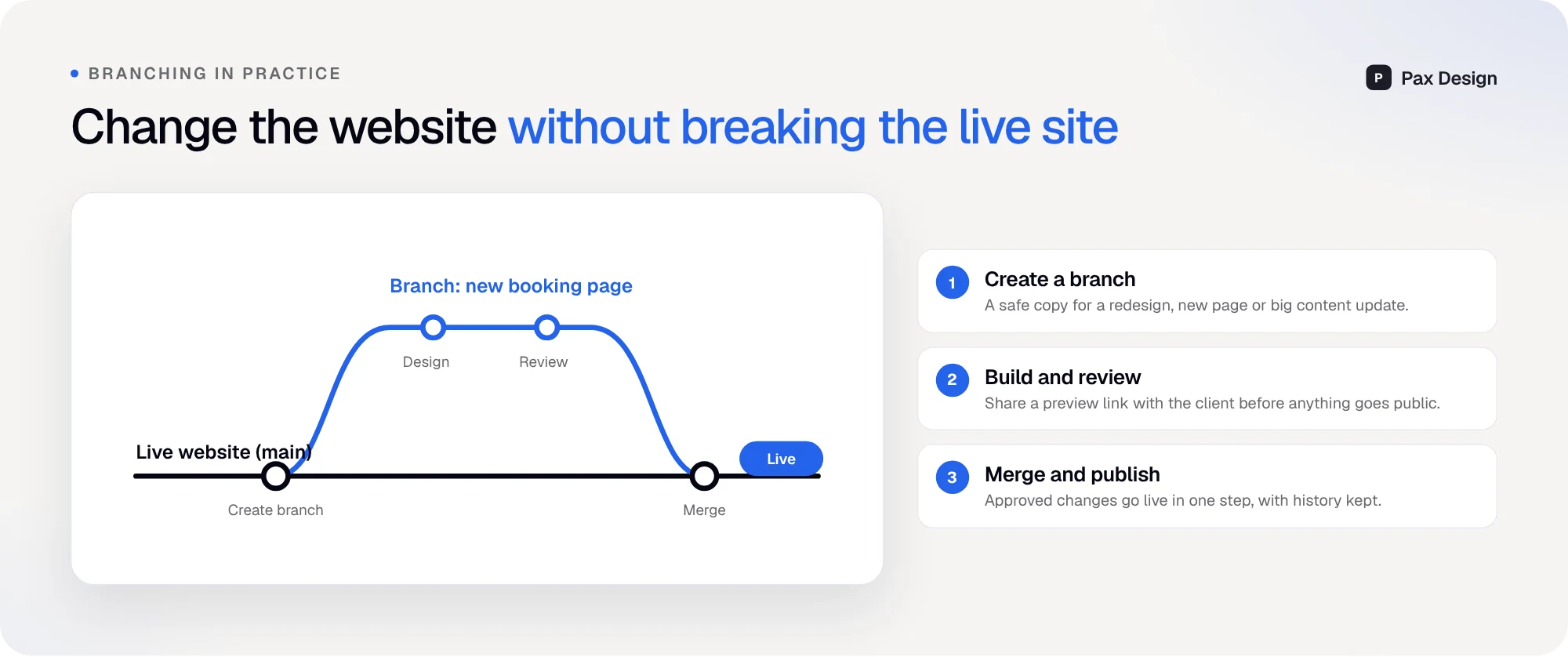
Branching is the feature we expect business owners to appreciate most, even if they never open Framer themselves.
Here is how it works:
Create a branch. A safe copy of the site for a redesign, a new page or a big content update.
Build and review. Share a preview link with the client or team before anything is public.
Merge and publish. Approved changes go live in one step, and the history is kept.
For a company that depends on its website for leads, this removes a real risk. A redesign of the booking page or a new pricing structure can be prepared and tested for days, while the current version keeps working. If something isn't ready, it simply stays on the branch.
External Agents and Automation
External agents allow tools outside Framer to read and update a project. That sounds technical, but the business use cases are practical:
Publishing blog posts and landing pages from a content workflow
Keeping prices, locations or vehicle lists in sync with another system
Running regular SEO and content checks without manual work
We use this ourselves to manage parts of our own website's CMS, and it fits naturally with the automations we describe in our guide to website automation for small businesses.
AI Localization for Businesses Selling in Two Languages
Many of our clients sell in more than one market. A Serbian company might want an English version for foreign clients, and a US company might want a Spanish version for part of its audience.
Framer has supported localization for a while, but keeping translations accurate and up to date took effort. With AI localization, the first version of each language is much faster to produce, and updates are easier to keep in sync. You still need a person who speaks the language to review the important pages, especially headlines, prices and legal text.
What Framer Makes Easy on a Real Website

On Line Rent a Car, a car rental company in Niš, a few Framer strengths show up clearly:
Two languages, one project. The Serbian and English versions are managed together, and AI localization makes adding or updating them faster.
Local intent in the headline. "Rent a car Niš" is in the main H1, and the team can adjust it in seconds when they test new messaging.
Trust numbers as content. Clients, vehicles and years of experience are editable from the CMS, so they stay current without a developer.
These details sound small, but they are exactly what makes a website easy to keep accurate, which matters for both customers and search engines.
Framer 3.0 vs WordPress in 2026
The question we hear most often is still whether a business should choose Framer or WordPress. Version 3.0 doesn't change the basic answer, but it widens the gap in a few areas:
Factor | Framer 3.0 | WordPress |
|---|---|---|
--- | --- | --- |
Design control | Visual, precise, no theme limits | Depends on theme and builder |
Speed and hosting | Included, fast by default | Depends on hosting and plugins |
Maintenance | No plugin or core updates | Regular updates and security patches |
AI help | Agents inside the real project | Plugins of varying quality |
Safe changes | Built-in branching | Staging depends on hosting |
Complex functionality | Limited, uses integrations | Huge plugin ecosystem |
E-commerce | Basic, usually via integrations | Strong with WooCommerce |
If you want the full comparison, read our article on Framer vs WordPress.
Is Framer Right for Your Business?

Framer is a strong fit if most of these are true:
Your site is a marketing or service website, with pages, CMS, forms and booking links
Design and speed matter to you, and you want good Core Web Vitals without extra work
Your team edits content often and doesn't want to wait for a developer
You run campaigns and need landing pages quickly
You need two or more languages
You don't want to deal with plugin updates, security patches or broken themes
It is not the right choice for every project. A large online store with complex inventory, a web application with user accounts or a site that depends on very specific plugins will usually be better served by another platform. We explain our reasons for choosing it in more detail in why we build with Framer.
What Framer 3.0 Means for SEO and AI Search
Framer sites were already fast and clean by default, which helps with rankings. Version 3.0 adds two things that matter for search:
Easier content maintenance. Agents make it practical to keep titles, descriptions, alt text and internal links consistent across dozens of pages.
Faster landing pages. Location and service pages, which are important for local SEO and AI answers, can be created and reviewed quickly on a branch.
The fundamentals don't change. Clear pages, real information and a fast site are still what Google and AI search reward. Our guide on showing up in Google AI Mode and ChatGPT explains those fundamentals in detail.
How We Use Framer 3.0 on Client Projects
The new features changed our process in a few concrete ways:
Every bigger change starts on a branch. New service pages, redesigned booking forms and seasonal campaigns are built on a branch, shared with the client through a preview link and merged only after approval.
Agents handle the repetitive work. Filling CMS collections, checking alt text, aligning meta descriptions and adding internal links across older posts takes minutes instead of an afternoon.
Designers spend more time on what sells. Because the routine work is faster, more of the project goes into the hero section, the offer, the booking flow and the proof that convinces people to call.
Content updates are no longer a ticket. Clients edit texts and prices themselves, and for bigger updates we prepare them on a branch so nothing breaks.
The result for clients is simple: changes reach the live site faster, with less risk and less back-and-forth.
Common Questions We Hear From Clients About Framer 3.0
Most clients don't care about the feature names. They ask whether their site will be faster, whether they can still edit it themselves and whether AI will make the site look generic. The honest answers are yes, yes and no, as long as a real designer stays in charge of the brand and the structure. AI speeds up the work, but the decisions about what your customers need to see remain human.
What to Check Before You Move to Framer
If you're considering a move from WordPress or another builder, plan these steps:
List every URL on your current site. Pages, blog posts and anything that brings traffic.
Plan redirects. Old URLs should point to the new ones so you keep your rankings.
Check integrations. Forms, booking tools, CRM, analytics and chat.
Decide on CMS structure. Blog, services, locations, projects and team.
Set up languages early. It is easier to plan localization from the start.
Conclusion: Faster, Safer Website Changes
Framer 3.0 doesn't change why businesses choose Framer: great design, fast hosting and easy editing. What it adds is speed and safety. AI Agents make changes faster, Branching makes them safer and AI localization makes multilingual sites practical for small teams.
If you're thinking about a new website or moving to Framer, book a free call and we'll tell you honestly whether it's the right fit for your business.
Frequently Asked Questions
When was Framer 3.0 released?
Framer 3.0 was released on June 17, 2026, with AI Agents, Branching, external agents and a redesigned community.
Do I need to rebuild my Framer site for version 3.0?
No. Existing Framer websites keep working. The new features are available in the editor, so you can start using them on your current project.
Can AI Agents build my whole website?
They can draft pages and sections quickly, but a good business website still needs strategy, copywriting and design decisions from people who understand your clients.
What is branching in Framer?
Branching lets you work on a copy of your website, review changes with a preview link and merge them into the live site only when they are approved.
Is Framer good for SEO?
Yes. Framer sites are fast by default and give you control over titles, descriptions, URLs, redirects and structured content. Rankings still depend on your content and authority.
Is Framer cheaper than WordPress?
It depends on the project. Framer includes hosting and removes plugin maintenance, while WordPress can be cheaper to start but often costs more to maintain over time.
Can I edit a Framer website myself?
Yes. Texts, images, blog posts and CMS items can be edited without coding, and Branching makes it safer to try bigger changes.

Lazar J.


