Website Redesign Checklist for 2027: What to Plan Before Q1

Digital Strategy


Most businesses decide to redesign their website in January, start in February and launch in late spring, just in time to miss the busiest months.
If you want a new website working for you in 2027, the planning should happen now. Audit what you have in November, prepare structure and content in December, design and build in January and launch in February, with redirects, tracking and speed checked before the switch.
A redesign is one of the biggest marketing investments a small or mid-size business makes. Done well, it brings more leads from the same traffic for years. Done badly, it can wipe out rankings that took years to build, or simply produce a prettier version of the same problems.
This checklist covers what to decide before the first design, how to protect your SEO, what has changed in 2026 that your new site should handle and how to plan a realistic timeline.
Signs Your Website Needs a Redesign
Not every website needs to be rebuilt. These are the signs that it probably does:
Visitors can't quickly understand what you offer or how to book
The site is slow on mobile, especially when someone taps a button or opens a form
Your team avoids editing it because it is hard or something always breaks
Your offer, prices, services or markets changed, but the website didn't
Leads have dropped while traffic stayed the same
The design looks noticeably older than your competitors
You need a second language or new service pages and the current structure can't handle it
If two or three of these sound familiar, read on. If only the look feels dated, a refresh may be enough.
Refresh or Full Redesign?
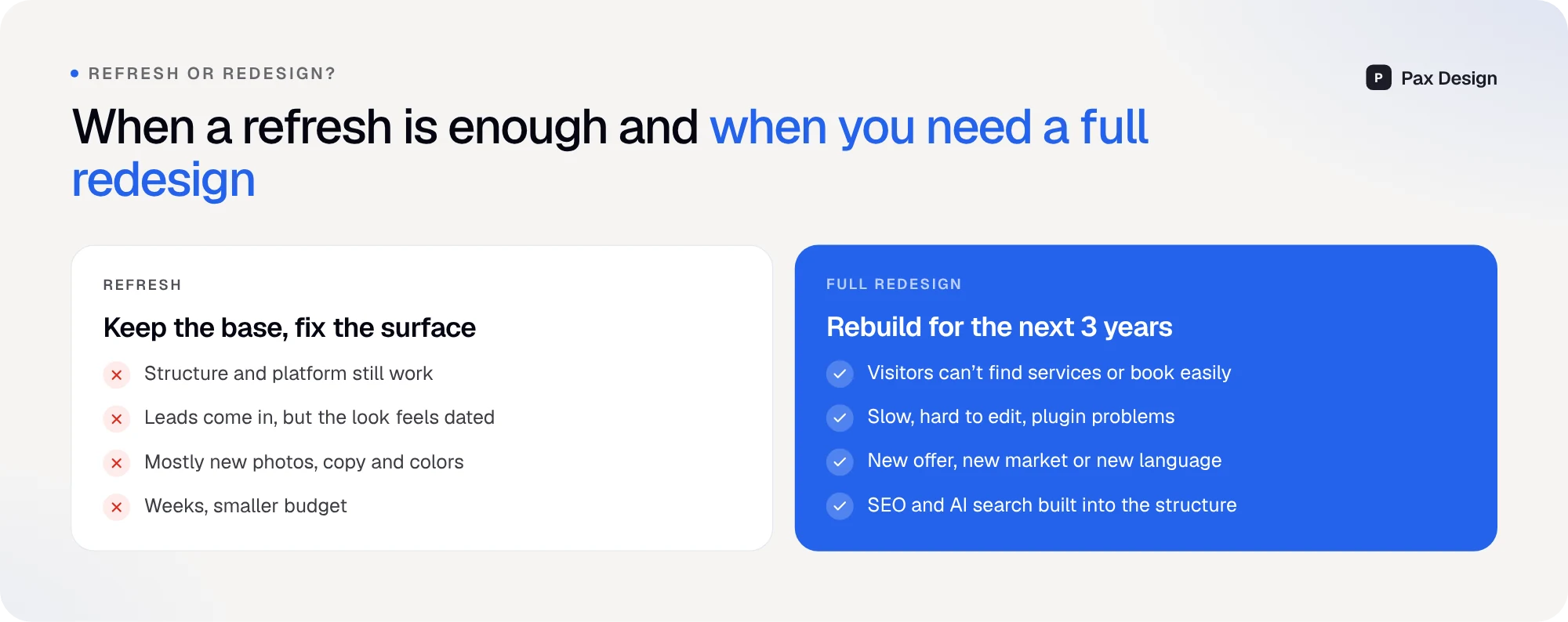
A refresh keeps the structure and platform and updates the surface: new photos, sharper copy, updated colours and a few improved sections. It takes weeks and costs less. It works when leads are coming in and the problems are mostly visual.
A full redesign rebuilds the site for the next three years: new structure, often a new platform, new content and SEO built into the foundation. It makes sense when visitors struggle to find services or book, when the site is slow and hard to maintain, or when the business itself has changed.
The worst outcome is a full redesign when a refresh would have done the job, or a refresh that only hides structural problems. Answer the questions below before you decide.
10 Questions to Answer Before You Redesign

Which pages bring leads today? Protect them. A redesign should improve these pages, not remove them.
What do people search to find you? Search Console shows the queries for each page.
Where do visitors drop off? Forms, pricing pages and booking steps are the usual suspects.
How fast is the site on mobile? Check Core Web Vitals, especially LCP and INP.
Is your offer clear in five seconds? Show the homepage to someone who doesn't know you and ask what you do.
Which content is outdated? Prices, team, services, photos and old blog posts.
Do you show enough proof? Reviews, case studies, client logos and numbers.
Is it ready for AI search? Clear answers, FAQ sections and structured data.
What will your team edit alone? Choose a platform that fits how you work.
How will you measure success? Leads, bookings and calls, not just traffic.
Write the answers down. They become the brief for your designer and the benchmark after launch.
Set Goals That Are About Business, Not Design
"Modern and clean" is not a goal. Good redesign goals are measurable:
Weak goal | Strong goal |
|---|---|
--- | --- |
Make it look modern | Increase quote requests by 30% in six months |
Improve SEO | Rank in the top three for our five main service and city searches |
Better user experience | Cut the booking flow from five steps to three |
Faster website | Pass Core Web Vitals on mobile for all key pages |
Show our work | Add case studies for our three most profitable services |
Clear goals make every later decision easier, from the homepage layout to which pages get the most budget.
Plan Structure and Content Before Design
The most common reason redesigns run late is waiting for content. Designers can't make good decisions about layout without real text, real photos and a clear page list.
Before design starts, prepare:
A sitemap. Every page, with its goal and target search query.
Page priorities. Homepage, main service pages, booking or contact, and top location pages first.
Copy for key pages. At least headlines, offers, prices and FAQ.
Real photos. Team, work, vehicles, products and premises. Stock photos rarely build trust.
Proof. Reviews, case studies and numbers you are allowed to publish.
If writing is the bottleneck, start with the pages that bring leads and improve the rest after launch.
Protect Your SEO During the Redesign
This is where redesigns cause the most damage. Rankings are tied to URLs and content, and changing both without a plan can cost months of traffic.
Export every URL. Use Search Console, analytics and a crawl of your current site.
Map old URLs to new ones. Every page that gets traffic or links needs a matching page.
Set up 301 redirects. Old addresses should permanently point to the new ones.
Keep what ranks. Don't remove content that brings traffic without replacing it with something better.
Check after launch. Watch Search Console for errors and ranking changes for several weeks.
Google's guide to moving a site with URL changes explains the technical side. The short version is simple: never launch without a redirect map.
What a 2027 Website Needs That a 2023 Website Didn't
A lot has changed in just a few years. If your current site was built before 2024, these are the gaps we see most often:
AI search readiness. Clear, quotable answers, FAQ sections and structured data, so your business can appear in AI Overviews, AI Mode and ChatGPT. Our guide on getting into AI answers covers this.
Responsiveness, not just loading speed. Google now measures how quickly pages react to taps and clicks with Interaction to Next Paint. Heavy scripts and plugins often fail here.
Automation built in. Forms that trigger instant replies, CRM entries and follow-ups. See our guide to website automation for small businesses.
Local and location pages. Real content for each important area, which supports both Maps and AI answers. Our local SEO checklist explains how.
Easy, safe editing. Platforms like Framer now let teams prepare changes on a branch before they go live. Read more in our article on Framer 3.0 for business websites.
Real Example: Conversion Details on the Door Buyer Redesign

For Door Buyer, an online store with a large catalogue of doors, the redesign focused on helping visitors find the right product and take the next step quickly:
Search as the main tool. With a large catalogue, search comes first and menus second.
One clear offer. "Get my free estimate" is visible on every page, so there is always a next step.
Objections answered early. Production time, delivery, shipping and warranty are visible near the top, before visitors start worrying about them.
None of these are decorative choices. Each one removes a reason for a visitor to leave.
A Realistic Redesign Timeline

For a typical service business website with 10 to 30 pages, this timeline works well:
November: audit and goals. Analytics, Search Console, top pages and what brings leads.
December: structure and content. Sitemap, page goals, copy and photos ready before design.
January: design and build. Key templates first, then CMS, forms and integrations.
February: launch and measure. Redirects, tracking and speed checks, then improvements based on real data.
Larger sites, online stores and multilingual websites need more time, but the order stays the same. Starting in November means your new site is working before the spring season, not during it.
Budget: What Actually Drives the Cost
Redesign budgets vary widely, and the price usually depends on a few clear factors:
Number of unique page templates, not just number of pages
Custom features like booking systems, calculators or customer accounts
Content work: copywriting, photography and translations
Integrations with CRM, booking software or payment systems
Number of languages
SEO migration work on large existing sites
A good agency will explain which of these drive your quote. We wrote about why this investment matters in why investing in a website in 2026 matters more than ever.
Redesign Mistakes to Avoid
Starting design before content and goals are clear
Removing pages that rank without redirects or replacements
Designing for the owner's taste instead of the customer's questions
Adding animations and effects that slow the site down
Launching without tracking, so nobody can prove the redesign worked
Treating launch as the end instead of the start of improvements
Many of these overlap with the website mistakes that are killing your sales.
Conclusion: Start Planning Now, Launch Before Spring
A redesign is not about a new look. It's about a website that brings more clients for the next few years. That starts with an honest audit, clear goals and content prepared before design, and it ends with careful SEO migration and measurement after launch.
If you're planning a new website for 2027, book a free call and we'll help you decide whether you need a refresh or a full redesign, and what to do first.
Frequently Asked Questions
How often should a business redesign its website?
Most business websites need a major redesign every three to five years, with smaller improvements in between. The right time depends on results, not age.
How long does a website redesign take?
A typical service business website takes six to twelve weeks from audit to launch. Larger sites, online stores and multilingual websites take longer.
Will a redesign hurt my Google rankings?
It can if URLs change without redirects or ranking content is removed. With a redirect map, preserved content and post-launch monitoring, a redesign often improves rankings.
Should I change platforms during a redesign?
Only if the current platform limits you, for example if it's slow, hard to edit or expensive to maintain. A redesign is a good moment to switch, because the structure is being rebuilt anyway.
What should I prepare before contacting an agency?
Your goals, a list of your most important pages, access to analytics and Search Console, examples of sites you like and any content you already have.
Is it better to redesign in winter?
For many businesses, yes. Planning in late autumn and launching in February means the new site is ready before the busiest season.
How do I measure if a redesign worked?
Compare leads, bookings, calls and conversion rate before and after launch, along with rankings and Core Web Vitals for your key pages.

Lazar J.


